Slayblade Controls & Battle Inputs
Master the mouse-only pull that decides every collision.
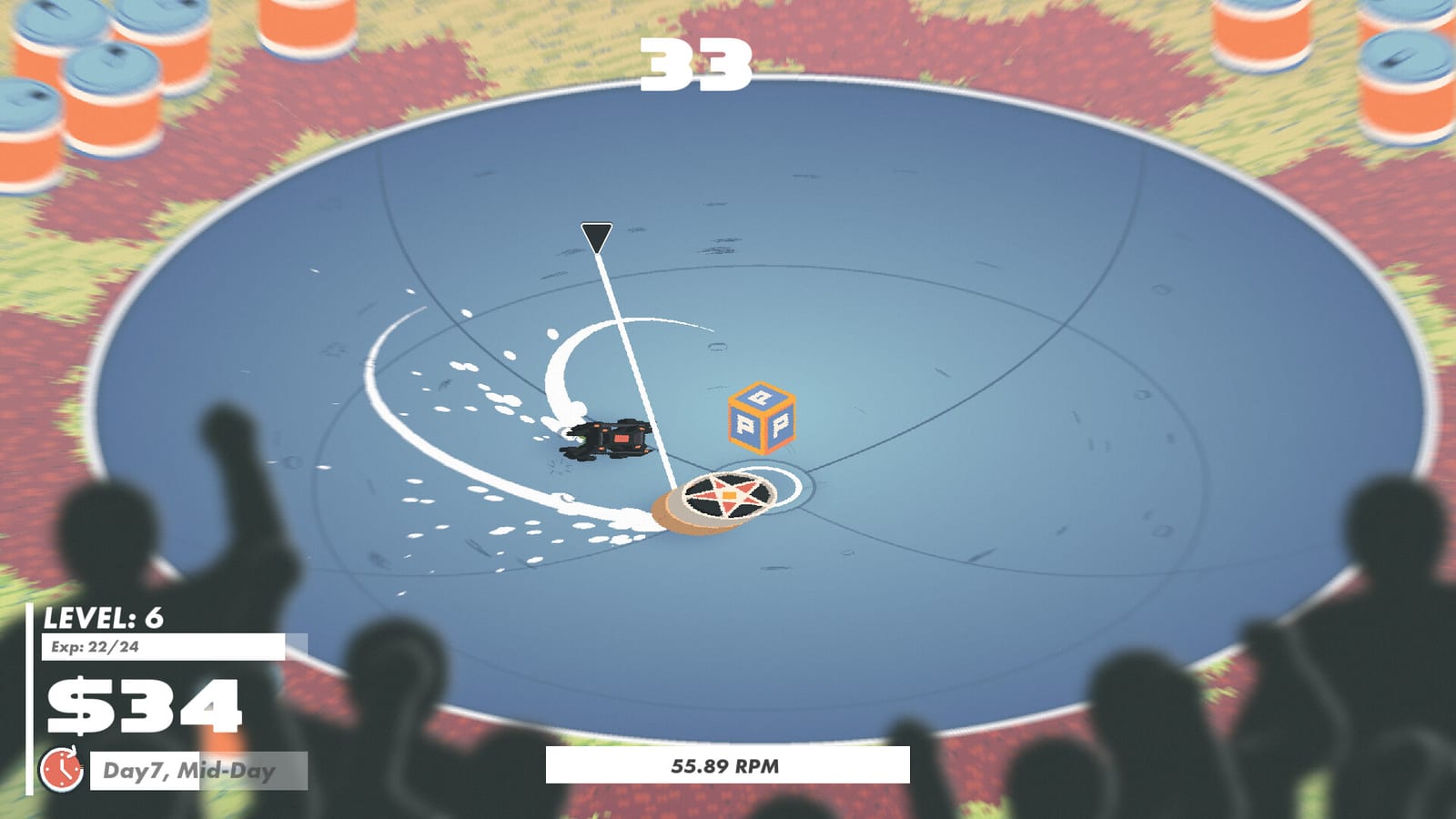
Slayblade markets itself as a game you can play with a mouse and left-click, and that promise is mostly literal. This controls guide breaks the input model into habits you can practice in the demo so you stop blaming random physics when the real issue was a weak pull, a late cube, or entering a bowl with terrible weight.
Core input: pull, charge, release
Battles open in a bowl arena. Hold left-click, drag to stretch your launch line, and release to send the top roaring forward. Longer, cleaner pulls generally build more RPM and therefore more collision authority. Short panicked taps leave you slow, which means the rival’s hit removes your spin instead. Treat the first two seconds like a golf swing: set the cursor angle, pull, and commit.
Why speed equals damage
Preview coverage is consistent: if you are moving faster than the opponent at contact, you deal the meaningful hit; if they are faster, you eat it. That single rule should reshape how you path around the bowl. Do not circle politely forever. Build a lane, gather RPM, and choose collisions you initiate. When you feel stunned after every bump, reopen this page and ask whether you arrived second to the impact.
Power-up cubes as a second skill shot
During matches, cubes spawn as interactive pickups. Hitting one fires the active effects on your equipped parts—ghost drains, barrier walls, mine drops, faster cube timers, and stranger merges. Cubes are not optional flavour; they are the combo engine. Practice glancing off a wall into a cube without ejecting yourself. Pair this page with Part Combos so you know which actives deserve greed.
Win conditions you must track
You win by knocking the rival out of the arena or by outlasting their spin. Ring-outs punish over-aggression near the lip. Spin-outs punish low RPM trading. Some bodies exist specifically to deny ring-outs—know what you equipped before you hug the edge. How to Win Battles expands these ideas into match plans.
City traversal is still mouse-first
Between fights you skate the miniature city, selecting nodes for shops, chores, and brawls. Keep the same left-click confidence: the fantasy is street-corner Beyblade energy, not a twin-stick shooter. If menus feel unclear in the demo, remember placeholder text still appears in places—check Demo Notes so you do not mistake unfinished UI for a broken install.
Practice drills for ten minutes
- In a safe match, only work on long pulls—ignore fancy cubes for one fight.
- In the next fight, take every cube even if it looks awkward.
- In a third fight, refuse cubes near the lip to train ring-out discipline.
- Rematch after swapping one part so you feel weight changes immediately.
- Replay Getting Started if the overall loop still feels fuzzy.
Related systems to study next
Cash pressure can force bad control habits—starving players take illegal matches before their RPM timing is ready. Read How to Earn Cash when wallet anxiety ruins your pulls. Hardware hiccups belong on System Requirements. Build ideas that reward precise cube timing sit in Beginner Builds and later Advanced Builds.
Controls in Slayblade are shallow to learn and deep to master because physics plus actives create emergent chaos. Film one loss, watch where your pull started, and correct that single beat on the next run. That loop beats hunting secret keybinds—there are none worth memorising beyond the mouse fantasy the developers advertise. Return to the Guides Hub when you need a wider map of tutorials.
Advanced routing notes
Think of the bowl as lanes. Outer lanes threaten ring-outs but create slingshot angles into cubes. Inner lanes are safer for spin wars. Switch lanes based on your win condition instead of camping one circle forever. When a barrier active is up, outer lanes become safer and you can play greedier.
Input hygiene
Disable mouse acceleration quirks if pulls feel inconsistent. Close overlay hotkeys that steal clicks mid-charge. If frames hitch, fix performance using System Requirements before rewriting your entire technique. Physics toys punish unstable frame pacing more than most strategy games.
Linking controls to builds
Cube-hungry engines demand precise routing; barrier kits forgive sloppier lines. Choose builds that match your current mechanical ceiling from Beginner Builds. Controls skill and shop skill rise together—neglect either and illegal matches will humble you.
Frequently Asked Questions
Quick answers to the most common questions.
Is Slayblade keyboard-only friendly?
The advertised fantasy is mouse and left-click. Learn that model first even if you later experiment with controllers.
What do power-up cubes do?
They trigger active effects on your equipped parts—the main source of combo plays mid-fight.
Why do I keep losing collisions?
You are probably slower at impact. Charge longer pulls and take fights you initiate.
How do I stop ring-outs?
Respect the bowl lip, and consider barrier-style bodies that raise walls when cubes are hit.